Help center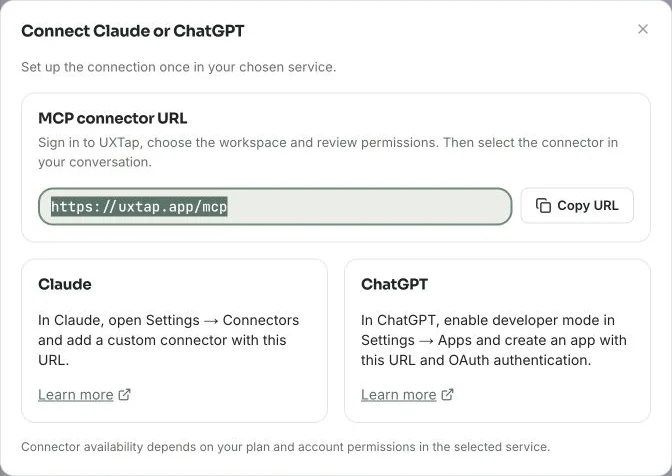
Connect Claude and ChatGPT
Read authorized research in your AI service using the MCP connector.
What it does
Read studies and results in Claude or ChatGPT with your current UXTap permissions.
When to use it
When you want to explore research in a conversation with your external AI service.
Before you begin
- A UXTap account with access to the intended workspace and studies
- A Claude or ChatGPT account whose plan and account permissions enable custom connectors
- Permission to share the selected data with the external service
See how it works
Real screens with demo data
1 / 5
01
Copy the connector URL
In the UXTap menu, open Connect your AI and explore the examples. Click Connect Claude or ChatGPT and copy the URL to use in the external service.
- Copying the URL does not authorize access
- Available in every UXTap plan
An example to try
Find the checkout study and request a summary of aggregate results with links to the evidence.
What you see in results
- The connection appears in Connect your AI after authorization; copying the URL does not connect your account.
- Search finds studies by title, and results can be filtered by version, device, outcome and partial responses.
- Queries respect your current access and keep responses over your plan quota veiled.
Avoid these mix-ups
- MCP is included in all four UXTap plans and does not use the AI analysis allowance. You use your own Claude or ChatGPT subscription.
- The connector only reads: it cannot edit or publish studies, recruit participants, generate internal analyses or make payments.
- Session responses and free text require read:sessions, initially unchecked. A new request for this permission opens another consent screen.
- Contact fields, panel variables and participant tokens are not shared. With evidence permission, approved recordings use temporary links lasting up to 60 seconds. Existing transcripts also require session-response permission. Email patterns and links are removed from text, but free text may still contain personal data; this does not guarantee anonymization.
- Each authorization lasts up to 90 days. Without current workspace or study access, the connection cannot restore that permission. Rate protections may ask you to pause before retrying.
- If sign-in opens the dashboard without completing the connection, start adding the connector again from the external service.
Keep learning
Read results and metrics
Move from collection counts to block-level evidence.
Manage team, account and comments
Provide suitable access and discuss evidence in context.
Configure consent and care for data
Review what research collects and how long it stays available.
Read studies through the API
Connect an integration using a key and read scopes.